corrupt.co.nz

’cause the world is

Archive for the ‘Computers’ Category

Get Those Deleted Files Back!

Posted by admin On April - 24 - 2009

recyclebinWe’ve all done it before, deleted a file that we shouldn’t have and when you check the recycle bin its not there. So we’ve all done it, but only some of us back up our files on a regular basis and for those people reverting to a version of the file a few days old might just cut it. For the rest of us its usually either fork out few hundred dollars for a data recovery expert to get the file back, or just accept the fact that its gone.

Little of us know that there are literally hundreds of download-able programs out there that can recover recently deleted files. Most of these programs are trials which allow you to list the files that are recoverable and then require to you pay a little money and buy a license to use the full featured programs which of course allows you to recover those files!

I have personally tried out close to a dozen of these programs and have a couple of which I recommend, due to success I’ve have had using them. Before I go on further I would like to give you a few tips for when you are in one of these dilemmas where you have deleted important files.

  • Don’t panic, when files are deleted all the computer does, is marks that section of the hard drive as available for writing to. The file is still there, just not visible.
  • As soon as you are aware of the file being deleted, avoid doing too much on the computer, which might overwrite the remnants of the file. This means, don’t carry on editing and saving other files, avoid downloading off the Internet and running programs which clean up your file system.
  • Run a few searches for the file, a lot of the time you may have accidentally dragged the file into an adjacent folder without knowing.
  • Avoid using multiple file recovery programs if the first couple don’t work. The job is now probably best for the experts so the less you play with the files, the greater chance they have of a successful recovery.

The first program that I recommend is simply called Restoration. This program has a basic interface which is easy and straight forward to use compared to other programs out there with a multitude of settings which can be changed. I have had success with this program in restoring thousands of files off my hard drive, almost 50GB worth! This program would definitely be my first port of call. Best of all this program is FREE.

The second program is one that I tried out when the first program had no luck in recovering files that I wished I never deleted. This program is called GetDataBack funnily enough, and there are versions for both FAT (USB sticks, and older versions of Windows) and NTFS (Windows XP and Vista). This program has an easy to follow step by step process, which is a lot less user friendly than the first program, but the upside is that it managed to recover files which the first program failed to! The downside to this program is that you do have to purchase a licence if you wish to recover the files which it detects.

These programs may be the first port of call for most of us which aren’t prepared to empty our wallets of hundreds to recover files. Having said that, if the files you need to recover are very very very important, I do recommend paying a professional to do it right the first time.

Fonts - The History and Basics

Posted by admin On April - 23 - 2009

font

Fonts - The History and Basics

Author: Rex Camposagrado

Fonts are a set of glyphs or images that represent characters from some particular character set in a particular size and typeface. The fonts term comes from the Middle French fonte, from fondre (meaning to melt or cast) which referred to type produced by casting molten metal at a type foundry. Fonts in printing, sometimes called Fount, are a complete set of type of any one size, with all the usual points and accents; a font consists of about 100,000 characters. In computers, a computer font is an electronic data file which contains a set of glyphs, characters, or symbols such as wingdings. Although the term font first referred to a set of metal type sorts in one style and size, since the 1990’s most fonts are digital and used for computers or computer devices.

Ascender is a leading provider of advanced font products specializing in type design, multilingual font development & licensing and software development for mobile phones. The Ascender team is renowned for its TrueType and OpenType font expertise, and can tune fonts and create custom fonts for on-screen legibility in Microsoft Windows as well as Digital TV fonts, Set Top Boxes, Mobile Phone fonts, Game Consoles fonts, Embedded Systems, Consumer Electronics and other devices.

Font History and Font Formats

There are different font formats - which one should I choose?

OpenType fonts (.OTF) - OpenType is a scalable format for computer fonts that was initially developed by MicrosoftTM, then later joined by AdobeTM Systems. OpenType fonts were first announced in 1996 and AdobeTM completed conversion of its entire font library to OpenType around the end of 2002. In 2005, there were around 10,000 fonts available in OpenType font format, with Adobe’s font library making up under a third of the total. As of 2006, every major font foundry and many minor ones were developing fonts in OpenType font format.

TrueType fonts (TT or .TTF) - TrueType is a digital font technology that was designed by AppleTMComputer, and is now used by both Apple (MacTM) and Microsoft (PC) in their operating systems. Microsoft has distributed millions of quality TrueType fonts in thousands of different styles. TrueType fonts offer the highest possible quality on computer screens, printers, and include a wide range of features which make them very easy to use. PostScript Fonts(Type 1) - PostScript fonts predates TrueType by about six years. First, there were many different font formats for digital fonts, none of which were standardized. Then Apple adopted Adobe’s PostScript page description language (PDL) for its Apple LaserWriter printer in 1985. This, combined with the introduction of desktop publishing software, sparked a revolution in page layout technology. ClearType Fonts(found on AscenderFonts.com) - Microsoft ClearType fonts are an unprecedented innovation in font display technology that dramatically improves font display resolution and marks a genuine breakthrough in screen readability.These Microsoft fonts were designed by Microsoft and leading type designers and font technologists to improve the reading experience in Windows VistaTMand Microsoft Office 2007TM.With ClearType font technology, the fonts on your computer screen look almost as sharp and clear as those printed on a piece of paper.

The choice of font format is mostly based on the kind of documents you create and your computer environment. Here are some general guidelines: OpenType TT OpenType TT fonts contain TrueType® outlines, and have a .TTF file extension. This is the default font format of both Macintosh and Windows systems. OpenType fonts with TrueType outlines are popular among home users and both small and large businesses or other enterprises. OpenType PS OpenType PS fonts contain PostScript® outlines, and have a .OTF file extension. OpenType PS fonts are replacing Type 1 fonts as users upgrade their systems. Type 1 PostScript Type 1 is the original font format that was part of the desktop publishing revolution that started in 1985. Type 1 fonts for PostScript and PostScript compatible printers consist of more than one file and have a limited character set. These limitations are overcome with OpenType fonts.

Font Characteristics

Font Weight

There are three basic categories of font weights: light, regular, and bold. The regular font weight for most typefaces is slightly lighter than medium. Many computer fonts for Microsoft Office, Web and common use come with a normal, regular and a bold weight. Font Weight relative order: thinultra lightextra lightlightsemi lightbookregular, (roman), plain, normalmediumdemi bold or semi boldboldextra boldheavyblackextra blackultra Font Width compressed, condensed, narrowwide, extended Font Families There are a multitude of typefaces that have been created over the centuries and they are commonly categorized into font families according to their appearance. At the highest level, one can differentiate between blackletter, serif, sans serif, and decorative fonts.

1. Blackletter Fonts Blackletter fonts were the earliest fonts used with the invention of the printing press. They resemble the artistic handwritings of cloisters in the Middle Ages and fall into three groups: Gothic fonts and Old English Text - Of all the blackletter fonts, the Gothic ones most closely resemble the Textura calligraphy used with manual copying of books. A Gothic typeface was thus also carved by Johannes Gutenberg when he printed his 42-line Bible, including a large number of ligatures and common abbreviations. While in Germany, Gothic fonts were quickly displaced, they remained in use in great variance and are frequently also referred to as Old English Text fonts.Schwabacher typefaces were predominant in Germany from about 1480 to 1530. Most importantly, all of the works of Martin Luther, leading to the Protestant Reformation, as well as the Apocalypse of Albrect Durer (1498) were printed in this typeface. It was probably initially used by Johannes Bamler, a printer from Augsburg, in 1472. The origins of the font name are unclear; some assume that the font was designed by a typeface carver from the village of Schwabach who worked externally and was thus referred to as the Schwabacher.Most commonly known among the blackletter fonts as those of the Fraktur font family, which stated when Emperor Maximilian I (1493 - 1519) established a series of books and had a new typeface created specifically for this purpose. Fraktur faces were widely used in Germany until the end of World War II.

2. Serif Fonts Serif fonts are divided into four font groups: Renaissance - this font type has a slight difference in thickness within each font. This font category includes the GaramondTMand PalatinoTMfont families.Baroque - this font type has a thickness within each font with greater variety. This font category includes the BaskervilleTMand Times New RomanTM font families.Classicist - the most variance of thickness with each font. This font category includes the BodoniTMand Century SchoolbookTM font families.Modern fonts - these fonts are designed mainly for decorative purposes. This font category includes the RockwellTMand AmasisTM font families.

3. Sans Serif Fonts Sans Serif fonts first appeared to be the “Egyptian” font released in 1816 by William Caslons’ foundry in England. The Sans Serif fonts are commonly used for display applications such as signage, headings and other applications where the font is needed to stand out and continuous reading is not a requirement. Sans Serif fonts are divided into four font groups: Grotesque - This font category includes the GrotesqueTMor Royal Gothic fonts.Neo-grotesques - This font category includes the Standard, ArialTMand UniversTM fonts.Humanist - This font category includes the Gill SansTMor FrutigerTM fonts.Geometric - This font category includes the FuturaTMor SpartanTM fonts. Other common Sans Serif fonts include: LucidaTM, TahomaTMand VerdanaTMfonts.

How to Download fonts

FontMarketplace.com makes is easy for you to download the font. For every item that you purchase there will be a download link on the order confirmation page. Additionally, the receipt that is automatically emailed to you will also have the links. For more information, please view our Font Help page section on “How to Download Fonts” How to Install fonts Fontmarketplace.com provides font downloads in two forms: Automatic Installer for Windows Manual install for Windows/Macintosh/Linux/Other For more information, please view our Font Installation page under Font Help. All trademarks are property of their respective owners. Please view our Trademarks page for more information.

About the Author:

Article Source: ArticlesBase.com - Fonts - the History and Basics

Theme Hospital

Posted by admin On April - 13 - 2009

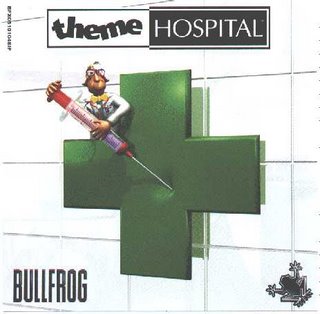
themehospitalTheme Hospital is an old classic which I recently found in my ever so large collection of cd’s. I thought what the heck, it’s Easter weekend, I have plenty of time to kill, so I went ahead and installed it. To cut a long story short, this game consumed three quarters of my weekend and I still haven’t finished it!

If you are not familiar with this game, its just over a decade old and was made my EA Games back in 1997. It was created after the great success its predecessor Theme Park was. The jist of the game is you are given an empty hospital in which you have to build all different sorts of hospital rooms, hire staff, treat patients and keep the hospital running whilst trying to achieve set goals to proceed to the next level, there are 3 competing hospitals in the same area. The game is filled with humor, for instance some of the sicknesses which you come across are Bloaty Head, Jellytitis, Baldness and Serious Radiation just to name a few. These illnesses are treated in different ways depending on what it is after the required research has been done.

In the corner of the game there is an advisor which gives you comments and tip offs throughout the game, a lot of the things he say are complete piss takes though, such as “You are three quarters of the way to losing this level” and ” Kill another 132 patients to lose the level”. Messages pop up through the game where you must make decisions on certain things such as whether or not to take a chance on a certain patients cure, whether or not to invite or fob off  VIPs who wish to visit your hospital or whether or not to accept a handful of patients from an emergency.

I found that Theme Hospital did not run too well on my Windows Vista computer, which is understandable seeing as this game was designed for DOS and Windows 95. To make it run properly I ran it through a program called DOSBox. This program emulates a computer running DOS, which makes all the old classic DOS games like Theme Hospital run fine on this days ultra computers (compared to a decade ago).

Nevertheless this game is fun and addictive, I have spent the good part of three days playing it and intend to spend however more longer it takes me to complete the remaining two levels.

April Fools - Conficker Virus

Posted by admin On April - 1 - 2009

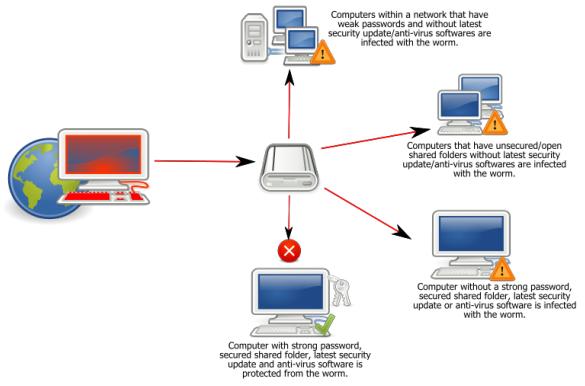
Conficker or sometimes called Downadup or Kido has had a bit of publicity recently due to the havoc it is meant to reek on April 1st, April Fools day. I was a bit sceptical at first but sure enough when i got to work today the first signs of it appeared. At work we support a large amount of computers approx 800 which are all networked together and we had a dozen or so phone calls relating to our antivirus software detecting a virus from end users.

I wont go into any detail but we searched the Internet and found out a few ways to stop Conficker from spreading further on the network than it had and information on security updates to immunize computers against it. To sum it all up, if your computer is up to date with windows updates and your antivirus software has up to day definitions then you are safe, the handful of computers we witnessed with Conficker we ones which for some reason or another weren’t up to date.

Conficker is known to mostly spread across networks in shared folders but is also known to spread through the use of USB flash drives. If it finds a vulnerable computer, it turns off vital services which keep the computer safe such as windows update, restore points and security services. It can also hijack your web browser and direct the unsuspecting to sales and download pages of malware programs. Eventually, if not already, the Conficker worm will have a strong infrastructure for cyber crimes. No one knows what exactly yet, but it will more than likely be more the usual such as botnet which is rented out to cyber criminals to send copious amounts of spam, steal identities and direct users to phishing sites.conficker